Cloud EMR, practice management & billing for independent practices and medical groups

Account Help
Find your Account ID
Your Account ID is the first part of your login address, for example tjones1234.onetouchemr.com. Everyone in your practice signs in at that address.
Where to find it
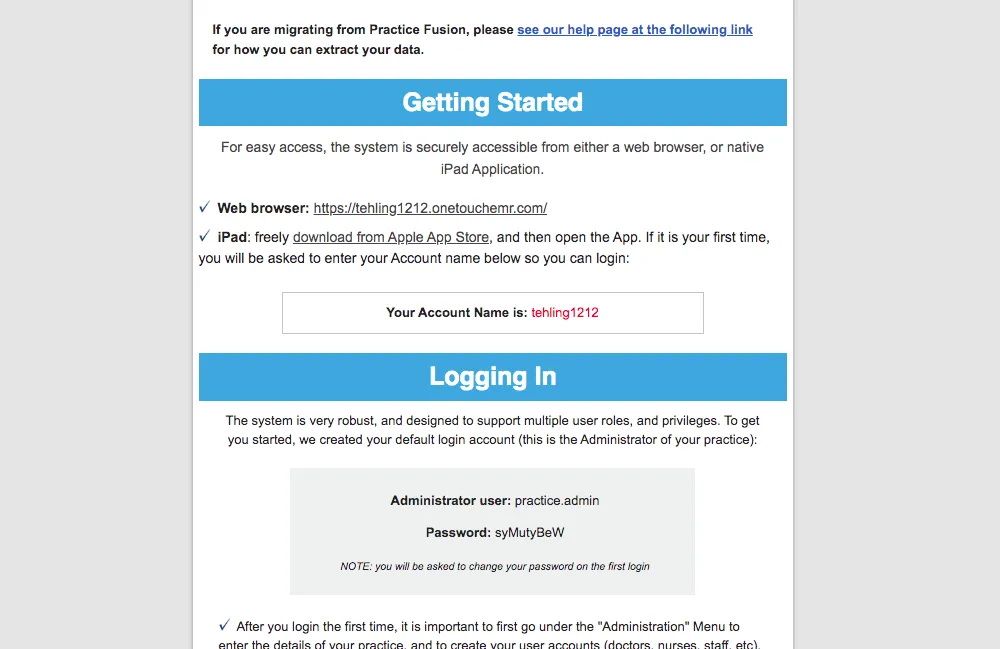
When your practice signed up, we sent a OneTouch EMR Activation Email. Your Account ID and login link are in its “Getting Started” section.
Can’t find the email? We’ll resend your link
Enter the email address used when your practice signed up. It must match our records for us to find your account.
When you first signed up, you were sent a "One Touch EMR Activation Email". This email contained your account name, along with a link to your account URL under the "Getting Started" area of the email. This URL is where you, and any staff member associated with your practice will sign into the system every time.
Forgot Your Account ID.
As mentioned above, you should have already received a special account link to use in your web browser (i.e. tjones1234), but If you forgot your URL, use the form below and we'll happily send the link to you. However, in order to find the account, the email address you enter must match original email address used to sign up for your account in order for us to locate your account URL.
Need a hand? Call 800-418-6824